
Guest Posting for SaaS: A Link-Building Plan for Your First 90 Days
A practical 90-day guest posting plan for SaaS: which pages to build links to, how many placements per month, a safe anchor text mix and how to measure results.
SaaS companies have a link-building problem. Their most valuable pages (pricing, features, integrations, comparison pages) are exactly the pages nobody links to naturally. Meanwhile, competitors with years of backlinks sit above them for every keyword that turns into a trial.
Guest posting is one of the few ways to build links to those pages on purpose. Done carelessly, it wastes money and can create risk. Done with a plan, it builds steady authority around the topics your buyers search for.
This guide gives you that plan: a practical 90-day guest posting roadmap for a SaaS company, with what to do each month, how many placements to buy, how to choose anchor text and how to measure results.
Key takeaways
- Point most guest post links at bridge pages and content assets, then pass authority to money pages with internal links.
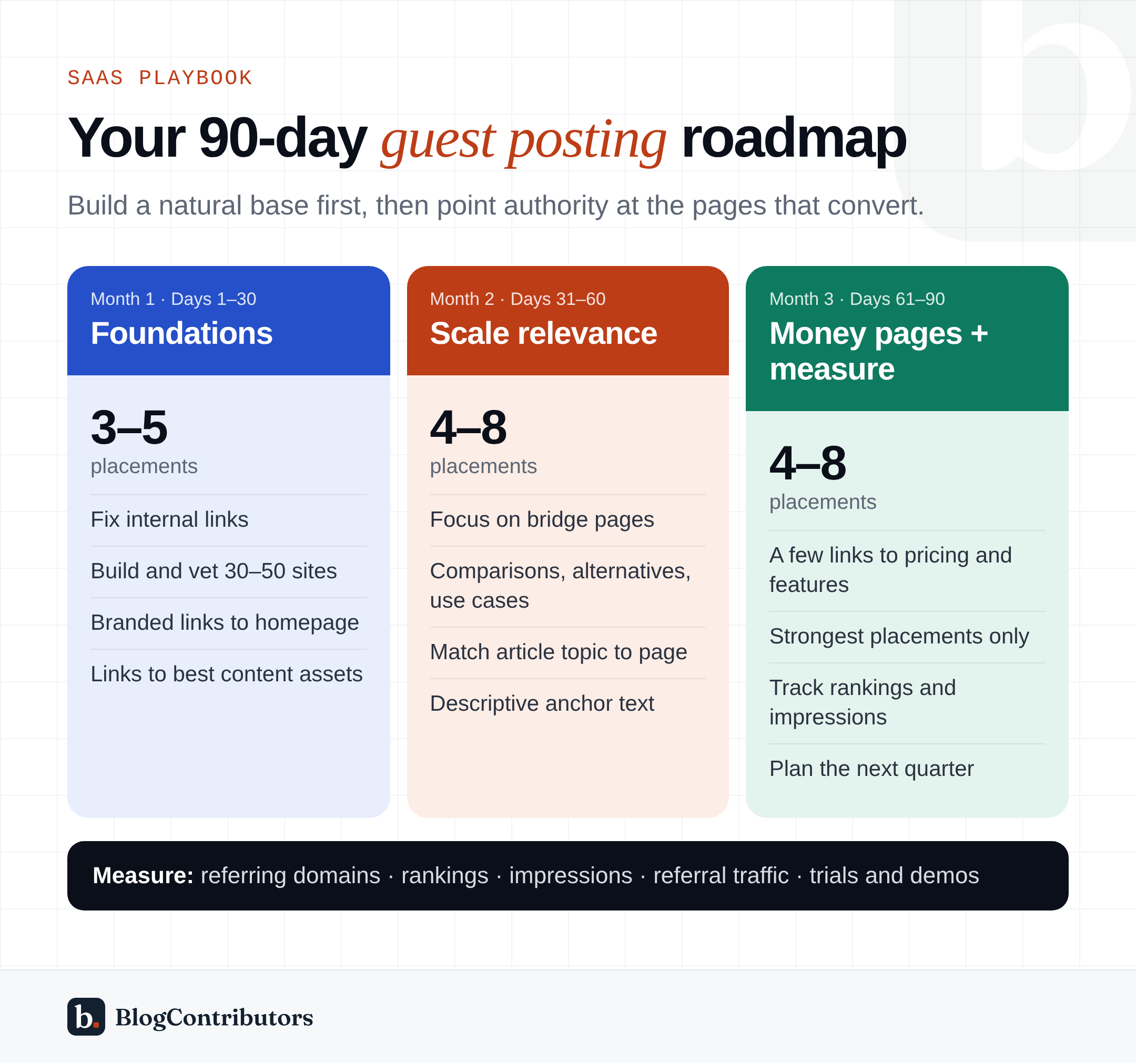
- Month 1: foundations and branded links. Month 2: scale relevance. Month 3: add a few money-page links and measure.
- Keep exact-match anchors to 5–10% of links at most.
- A realistic 90-day budget starts at around $2,700 for 9–12 placements.
Before you start: three decisions
1. Which pages need links?
List the pages that drive signups and sort them into three groups:
- Money pages: your homepage, pricing, product and feature pages. They convert, but they rarely attract links on their own.
- Bridge pages: “X vs Y” comparisons, alternatives pages, use-case and industry pages, and integration pages. They rank for buying-intent searches and pass authority to money pages through internal links.
- Content assets: in-depth guides, templates, free tools, original research and glossaries. They are the easiest pages to link to naturally and they spread authority across the site.
Most SaaS sites get the best results by pointing most guest post links at bridge pages and content assets, and fewer directly at money pages. Strong internal links then carry that authority to the pages that convert.
2. Who are you competing with?
Pick three to five competitors that rank for your most important keywords. In Ahrefs or Semrush, compare:
- the number of referring domains to their homepage and their top-ranking pages,
- how fast they are gaining new referring domains each month, and
- which sites link to them, since many of those sites may accept guest posts.
This gives you a realistic target. If competitors gain 15 new referring domains a month, five guest posts a month will not close the gap on their own. They can still make a real difference to specific bridge pages.
3. What is your budget?
Good guest posts on relevant sites typically cost $200–$500 each. In our own marketplace the median is $300. Our guest post pricing guide breaks down what drives cost. For a 90-day plan, a realistic budget looks like this:
| Plan | Placements over 90 days | Approximate budget |
|---|---|---|
| Starter | 9–12 | $2,700–$4,500 |
| Growth | 15–20 | $5,000–$8,000 |
| Competitive | 25–35 | $9,000–$15,000+ |
Spread the budget across the three months rather than front-loading it.
Month 1: foundations (days 1–30)
The first month is about getting the basics right and placing your first links on the most relevant sites.
Fix internal linking first
Before you place a single guest post, make sure your bridge pages and content assets link clearly to your money pages, and that money pages link back to relevant guides. Every external link you build later will work harder because of it.
Build your target list
Shortlist 30–50 sites across these categories:
- Core relevance: sites about your exact category, such as HR tech, developer tools or marketing software.
- Adjacent relevance: sites your buyers read for their job, such as general business, marketing, technology and startup publications.
- Industry relevance: sites in the industries you sell into, if you have vertical use-case pages.
Vet each site with our 12-point checklist. Pay most attention to real traffic, topical fit and outbound links.
Place your first 3–5 links
Start with your strongest, most relevant sites, and point these first links at:
- your homepage, using your brand name as anchor text, and
- one or two of your best content assets, using descriptive anchors.
Brand-name links to the homepage are the most natural links a company can have. They also give you a safe base before you build links to commercial pages.
Month 2: scale relevance (days 31–60)
With the foundations in place, month two is about volume and topical depth.
Increase to 4–8 placements
Keep the pace steady. Natural link profiles grow gradually, so a jump from 3 links in month one to 30 in month two looks unusual. Aim for a modest, consistent increase.
Shift focus to bridge pages
Point most of this month’s links at comparison, alternatives, use-case and integration pages. These pages rank for searches like “[competitor] alternatives” or “[category] software for [industry]”. Those are some of the highest-converting searches a SaaS site can win.
Match article topics to the target page
The article and the link should belong together. For example:
- An article about “how small teams handle payroll compliance” linking to your payroll use-case page.
- An article about “choosing a project management tool for agencies” linking to your agency comparison page.
- An article about “automating sales follow-ups” linking to your CRM integration page.
When you order through BlogContributors, you send the topic, the target URL and the anchor text. Our writers produce a 2,000–2,500 word article built around that link, so the context is natural.
Use a healthy anchor text mix
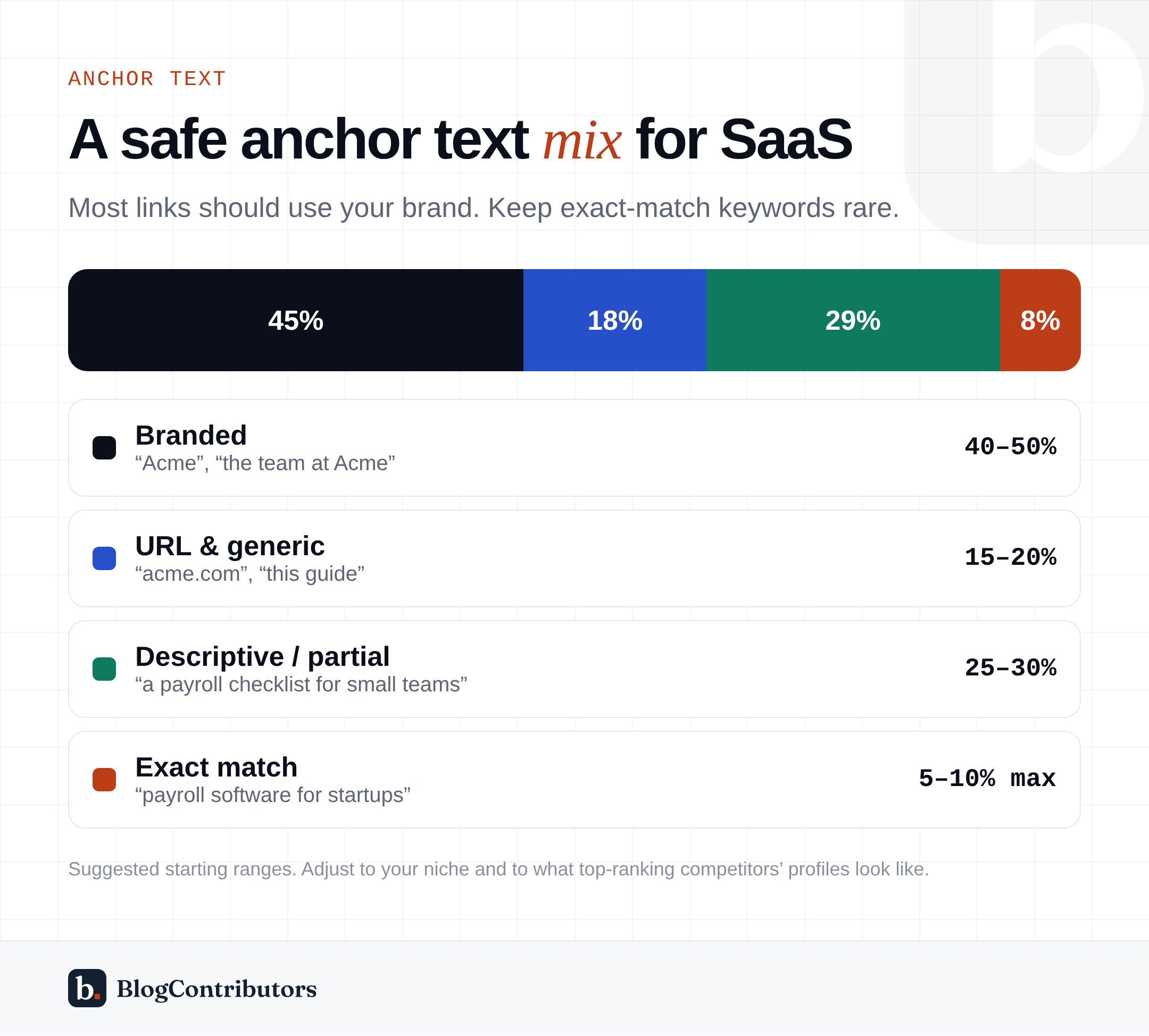
A good starting mix, using a fictional brand called “Acme”:
- Branded (about 40–50%): “Acme”, “Acme’s payroll tool”, “the team at Acme”.
- URL and generic (about 15–20%): your plain domain name, “this guide”, “here”.
- Descriptive or partial match (about 25–30%): “a payroll checklist for small teams”, “how Acme handles contractor payments”.
- Exact match (5–10% at most): “payroll software for startups”.
Exact-match commercial anchors are where most of the risk sits. Google’s spam policies specifically mention guest posts with “keyword-optimized anchor text”. Use them sparingly, on your strongest and most relevant placements. Read more in dofollow vs sponsored links.
Month 3: push money pages and measure (days 61–90)
Add a small number of money-page links
By now your link profile has a natural base of branded and content links. This is the time to add a few links directly to pricing, product or core feature pages, using your strongest placements and descriptive anchors.
Keep a steady pace
Continue with roughly the same number of placements as month two. Consistency matters more than any single month’s volume.
Measure what changed
Link building is slow. Many links take weeks or months to be fully counted, so judge a 90-day plan by leading indicators, not just revenue:
- Referring domains: new, unique linking sites to each target page.
- Rankings: position changes for the keywords each target page is meant to rank for. Track them in Google Search Console or a rank tracker.
- Impressions: Search Console impressions for target pages usually rise before clicks do.
- Referral traffic: visits from the guest posts themselves, shown in your analytics.
- Trials and demos: conversions from organic search to the pages you built links to.
Record a baseline on day one, then compare at day 45 and day 90. Expect rankings for bridge pages to move first, and money pages later.
A worked example: a 90-day plan for an HR SaaS
Here is how the plan might look for a fictional HR platform, “Acme HR”, with a growth budget of about $6,000:
| Month | Placements | Target pages | Example anchors |
|---|---|---|---|
| 1 | 4 | Homepage (2), “Employee onboarding checklist” guide (2) | “Acme HR”, the plain domain, “this onboarding checklist” |
| 2 | 7 | “BambooHR alternatives” (2), “HR software for startups” use-case page (2), Slack integration page (1), PTO policy template (2) | “alternatives to BambooHR”, “an HR tool built for small startups”, “Acme HR’s Slack integration” |
| 3 | 7 | Pricing page (1), features page (2), use-case pages (2), onboarding guide (2) | “Acme HR’s pricing”, “HR software for startups” (once), descriptive anchors |
That is 18 placements at an average of about $330, mostly on business, HR and startup publications. Only one link in the whole plan uses an exact-match commercial anchor. By day 90, Acme HR should see new referring domains on every target page. It should also see rising impressions for its alternatives and use-case pages, and early ranking movement on its most-linked guide.
Choosing the right sites for SaaS
SaaS buyers are usually professionals researching tools for work. The best publications for SaaS guest posts tend to be:
- Technology and software sites that review or cover tools in your category.
- Business and startup sites read by founders, operators and managers.
- Marketing sites, if your product serves marketers or growth teams.
- Industry sites for the verticals you sell into.
In our marketplace you can filter by niche, such as Technology, Business or Marketing, and by DR range and minimum traffic. Each listing shows its link type and the date its metrics were last checked.
How to brief each article
A clear brief is what turns a paid placement into a useful article. For every order, decide:
- The target URL: the exact page the link should point to.
- The anchor text: chosen according to your anchor mix, not picked at random.
- The topic: a question your buyers actually ask, close enough to the target page that the link fits naturally.
- The angle: what makes this article useful on its own, such as a checklist, a framework, examples or data.
- Things to avoid: competitor names, claims your legal team would not approve, or topics you have already covered on the same site.
Keep the brief short and specific. Good writers need direction, not a script. If you order through BlogContributors, you send these details after you order, and our writers handle the rest.
Common SaaS guest posting mistakes
- Pointing everything at the homepage. It builds overall authority but rarely moves the pages that convert.
- Pointing everything at the pricing page with exact-match anchors. It is the fastest way to create an unnatural link profile.
- Buying on DR alone. A DR 80 site with little real traffic and no topical fit is usually worse than a relevant DR 55 site with a real audience. See DR vs traffic.
- Thin content. Short, generic articles do not hold up with editors, readers or search engines.
- Stopping after one month. Most of the value of link building compounds over time. A steady program beats a one-off burst.
- Not tracking placements. Keep a sheet of every live URL, target page, anchor and date, and recheck it every few months.
Frequently asked questions
How long until guest posts affect rankings?
Google needs to crawl the new page, find the link and re-evaluate your page. That can take anywhere from a few weeks to a few months. Competitive keywords usually take longer. Judge results over a quarter, not a week.
Should we build links to blog posts or product pages?
Both, in different proportions. Links to guides and bridge pages are more natural and easier to justify, and internal links pass their authority on. Add a smaller number of links directly to product and pricing pages once you have a solid base.
Is guest posting enough on its own?
Rarely. The strongest SaaS link profiles combine guest posts with digital PR, integration and partner pages, review sites, original research people cite, and founder interviews. Guest posting is the most controllable part of that mix, which makes it a good place to start.
Your 90-day checklist
- Map money pages, bridge pages and content assets.
- Fix internal links between them.
- Benchmark three to five competitors’ referring domains.
- Set a budget and a monthly placement target.
- Build and vet a list of 30–50 relevant sites.
- Month 1: 3–5 placements, mostly branded links to the homepage and content assets.
- Month 2: 4–8 placements, focused on bridge pages with descriptive anchors.
- Month 3: a similar pace, adding a few money-page links on your strongest placements.
- Track referring domains, rankings, impressions, referral traffic and conversions.
- Review at day 90 and plan the next quarter based on what moved.
Ready to build your shortlist? Browse verified websites, filter by your niche and see each site’s price, metrics and link type before you order.